Everyday and scientific math
Calculate with Standard and Scientific modes, memory, previous answers, trigonometry, logarithms, powers, factorials and fraction approximations.

A powerful calculator. Your private space.
Free offline scientific and graphing calculator with 37 useful tools and an encrypted local vault for passwords, photos and files. No ads, purchases or accounts.
A public Google Play download is not available yet.
Take a look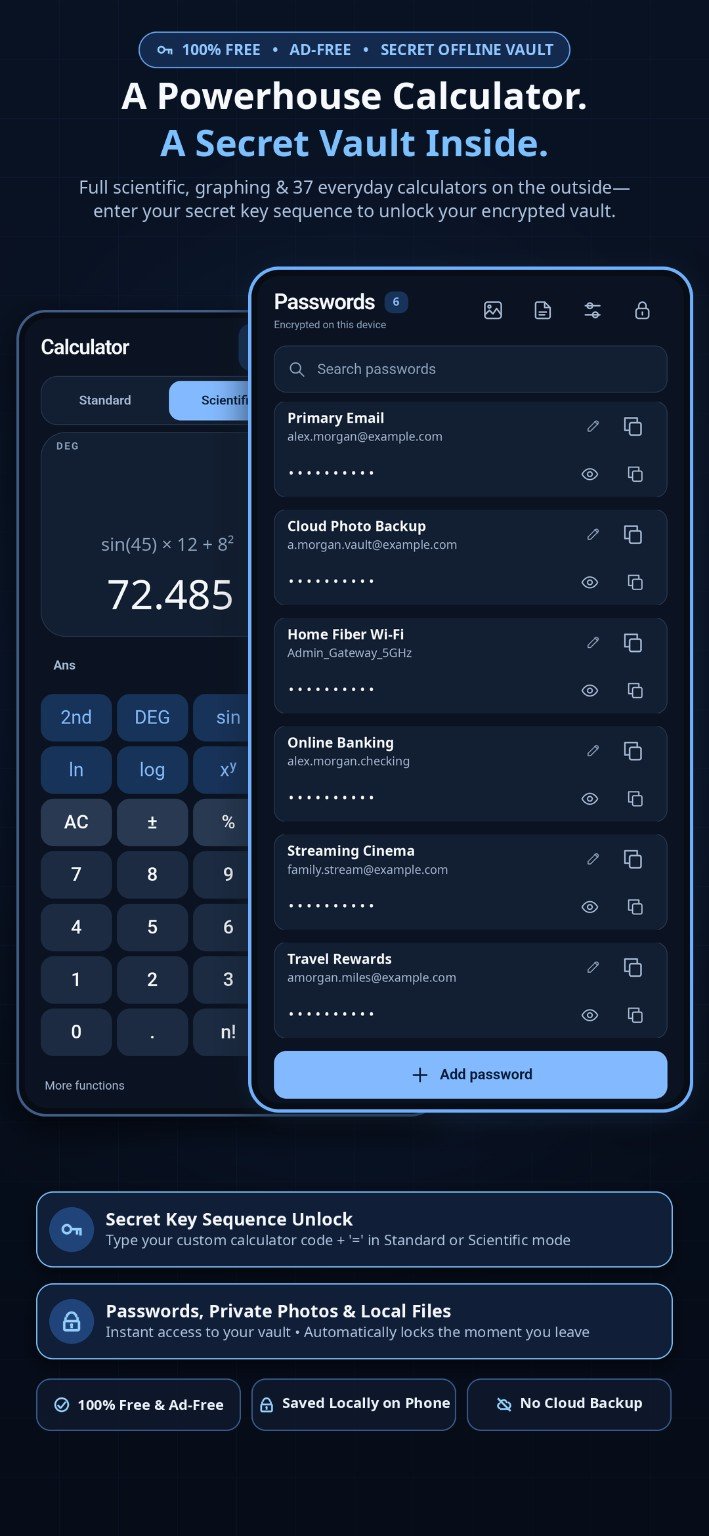
Google Play production access is under review. A public download is not available yet. The availability shown here will be updated after release is confirmed.
Explore the calculator, tools and private space.
Swipe to browse. Select an image to enlarge it. These supplied promotional screenshots show the app’s features. Imported originals and deliberately exported readable copies remain outside the vault and can follow another app or storage provider’s backup settings. Encrypted backup exports contain passwords only, not photos or files.
Calculate with Standard and Scientific modes, memory, previous answers, trigonometry, logarithms, powers, factorials and fraction approximations.
Search the collection, star favorites and revisit recent tools. Explore savings and retirement estimates, pay, bill splitting, home projects, dates, conversions and interactive math activities.
Plot up to three real-valued functions together. Pan, pinch to zoom, trace curve coordinates and compare a table of values.
Unlock with your personal calculator-key sequence. Search by account or username, reveal passwords when needed, generate 20-character passwords and copy values separately.
Keep encrypted local copies of JPEG, PNG and WebP images, PDFs, supported text and general files. View photos, PDF pages and supported text inside the vault.
Choose Graphite Mint, Ivory Copper or Midnight Blue, plus result size, angle unit and decimal precision. Private settings offer four calculator icons and six launcher names.
Backup password recovery is off by default. Enable a separate backup password in the unlocked private settings after verifying your main password.
No ads, subscriptions, in-app purchases, accounts or analytics. Core calculator and vault features work offline.
Explore savings growth, 401(k) forecasts and employer match; pay, overtime, markup and break-even estimates; cent-accurate tip and bill splitting; home projects, travel, dates and a nine-category unit converter. Search, favorites and recent tools help you return quickly.
Financial results are educational estimates from your amounts, timing and assumptions. They are not personalized financial advice or guaranteed future returns. Calculator field values are not automatically saved for a later session; favorites and recents remember tool names, not your balances or salary.
Calculator Vault has no account system, ads, analytics, cloud sync or Internet permission. It creates encrypted private copies on your phone. The app cannot recover a lost device’s data, and uninstalling or clearing its storage deletes the local vault and keys. Keep any separate copies you need before changing phones.
Choose and confirm your own calculator-key sequence during setup. In Standard or Scientific mode, enter your exact chosen sequence. Include = only if you chose it as part of your sequence. After setup, ordinary launches open the calculator. Keep your sequence private.
Images accepts JPEG, PNG and WebP pictures. Files stores encrypted local copies of PDFs, plain text and general files up to 25 MiB each. PDF pages and supported UTF-8 text can be viewed inside the vault; text preview is limited to 2 MiB. Other formats can be stored and exported, without built-in Office editing, archive extraction or media playback.
No. Import creates a separate encrypted copy. The original photo or document remains in its original location and follows that location’s privacy and backup settings. Delete or manage the original separately if you need to.
Optional backup password recovery is off by default. You must enable it in private settings while unlocked and verify your main password. When enabled, enter 00000000 then = and supply the separate backup password; a correct answer requires setting a new main password. There is no email reset or universal recovery password.
No. You can deliberately export an encrypted password-only backup and restore it with the main password active when it was exported. Images, files, thumbnails, storage keys and recovery credentials are excluded. Recovery cannot restore data after uninstalling, clearing app storage, losing the phone or changing devices.
Yes. While unlocked, choose Save a copy to phone for one item. The encrypted vault copy is retained. The exported copy is readable outside the vault; a document provider or photo-backup app may copy or upload it under your settings. Vault storage itself has no cloud synchronization.
Leaving the app or locking the screen locks the private area. On supported Android versions, a deliberate file/image picker can return to the same still-valid private session, including after cancellation. An interrupted, expired or uncertain return requires unlocking again. Older Android versions use the stricter re-unlock fallback. Fresh launches open the calculator.
Open Help & support from the unlocked private settings. Rate, Share and Send feedback are optional actions there, with no public-calculator prompts. An external app opens only after your choice; feedback opens an email draft without attaching vault contents or sending automatically.
A couple more apps you might enjoy.
Explore 21 calculators and tools, 442 offline guides, and interactive retirement journeys. Save your plan on your device, with no ads or in-app purchases.
Keep several weeks in view, add plans in your own words and see everyday life with a little more perspective.
Get app-specific help or read how Calculator Vault handles information.